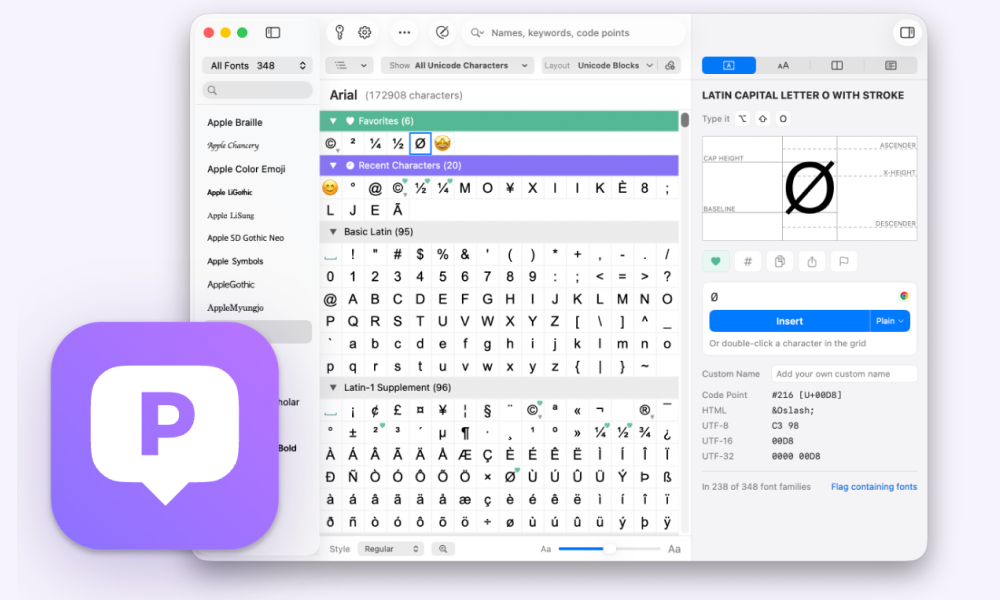
PopChar 11 for Mac is here. It’s one of the biggest updates in PopChar’s history: a redesigned window, a Character Inspector, a new Compact mode and side-by-side font comparison. It also supports Unicode 18.0 and runs on macOS 27.
PopChar is a Character Map for Mac and Windows, developed by ergonis in Austria and first released in 1987. You press the shortcut, find the character and insert it right where your cursor is, in any app. That’s how people who work with special characters every day have used it for nearly 40 years.
What’s new in PopChar 11
- A redesigned window with fonts, characters and the character inspector side by side
- Compact mode: a small character grid with your favorites and recently used characters
- Font comparison: one character in two fonts, with lines for baseline and x-height
- Insert as image, from 64 to 1024 px
- Shape Finder now lists characters that look similar to the one you selected
- Unicode 18.0, including the newest emoji, and support for macOS 27
A redesigned window
The new window has three areas. Fonts on the left, characters in the middle, the character inspector on the right.
The Inspector shows the name, keyboard shortcut, Unicode code and HTML entity of the selected character. So you can type it from the keyboard next time, or paste the entity straight into your code.
A single click shows the character enlarged. A double-click inserts it at the cursor position. All features are on the PopChar features page.
See which fonts contain a character
PopChar shows which of your installed fonts contain a character. You know before the text goes into a document or layout whether the character will show up in the font you picked. One click flags every installed font that contains it.
Compact mode: characters right next to your text
In Compact mode, both sidebars disappear and PopChar shrinks to a small character grid with your favorites and recently used characters. If you like, the window stays open after you insert a character, right next to the text you’re working on.
That helps when you need the same few characters again and again: accented names in a translation, arrows in a manual, € and ½ in a price list.
Compare a character in two fonts
The new comparison view puts the same character side by side in two fonts. Lines for baseline and x-height make differences in shape and size visible right away.
Choosing a typeface for a headline, a logo or a print job? Check how the ampersand or the ligature looks in both candidates before you decide. Our guide How to compare fonts on a Mac covers what to look at and 4 ways to do it.
Also new in PopChar 11
Insert as image
Characters go into a document as an image at 64 to 1024 px. They look the same on computers where the font isn’t installed.
Find similar shapes
You could always sketch a character to find it. Now the Shape Finder also lists the look-alikes of any selected character, which helps when the one you found is almost, but not quite, the right one.
Unicode 18.0 and macOS 27
PopChar 11 supports the latest Unicode standard, including the newest emoji, and runs on macOS 27.
Why we redesigned PopChar
“Many of our customers have relied on PopChar for decades, so we wanted to preserve what already worked while bringing the user experience up to modern standards,” says Thomas Reichenberger, CTO of ergonis. “With PopChar 11, we’ve completely rethought the interface to make finding and comparing characters easier, while keeping the speed and simplicity that have always defined PopChar.”
Apple co-founder Steve Wozniak, a long-time PopChar user, has called PopChar “an absolute must-have for anyone serious about fonts, typography and design.”
Get PopChar 11
PopChar 11 requires macOS 13 or later and runs on macOS 27.
New to PopChar? Download free trial and try it in your own apps.
Already using PopChar? Download PopChar 11 and upgrade directly in the app.
General questions about PopChar, licenses or typing special characters on a Mac? The PopChar FAQ and the PopChar Help Center have the answers
Related to