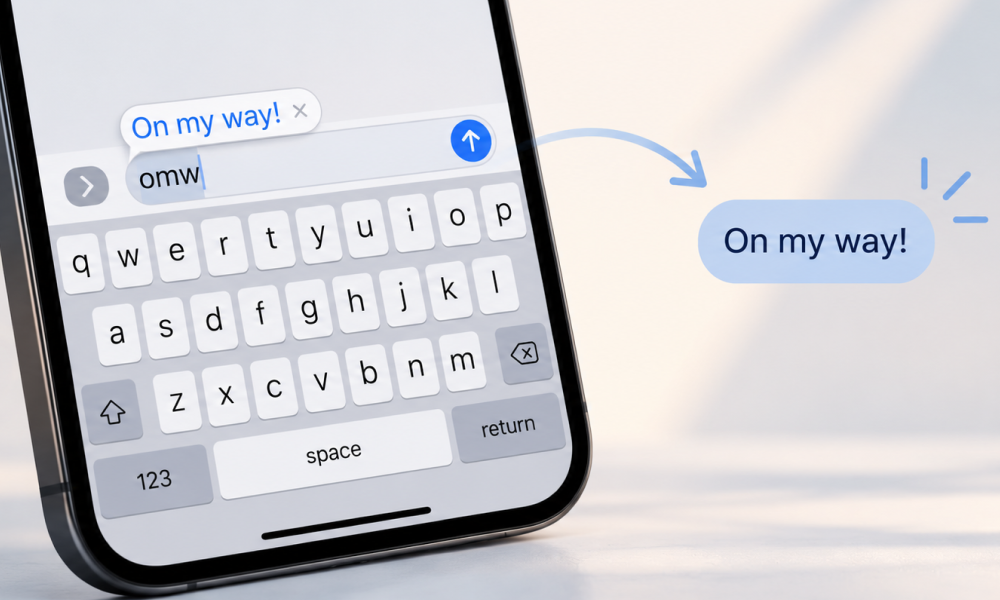
You type the same things on your phone all day. Your email address. Your home address. The same three-line reply to the same kind of message.
Your iPhone can type them for you. The feature is called Text Replacement, it's free, and it's been sitting in Settings the whole time. You type a short trigger, press space, and the full text appears. Some people call these typing shortcuts, text shortcuts or word replacements. Same thing.
Here's how to set it up, and the point where it reaches its limits.
How to set up text replacement on iPhone
- Open Settings.
- Tap General, then Keyboard, then Text Replacement.
- Tap the plus button in the top corner.
- In the Phrase field, type the full text you want (for example, your email address).
- In the Shortcut field, type the short trigger you'll type (for example, `@@`).
- Tap Save.
Now type your shortcut, press space, and the phrase appears. Apple ships one example so you can see it work. Type `omw` and a space, and it turns into "On my way!"
Pick triggers you'd never type by accident. Two characters like `@@`, or a short string like `myaddr`, work well. Skip real words, or autocorrect keeps trying to change them back.
It syncs across your Apple devices
Sign in to the same Apple Account on your iPhone, iPad and Mac, and your text replacements sync through iCloud. Add one on the iPhone, and it shows up on the Mac. Add one on the Mac (System Settings, Keyboard, Text Replacements), and it shows up on the phone.
This is the real strength of the built-in feature. It's free, it's already on every iPhone, and it works in almost any text field with no setup. For a handful of common phrases, that's enough.
Where the built-in feature stops
The limits show up fast once you want more than a few plain phrases.
Plain text only. No bold, no links that keep their formatting, no images. What you store is raw characters.
No dynamic content. It can't insert today's date, place your cursor mid-sentence, or pause for you to fill in a name. Every expansion is fixed.
One flat list. Every entry lives in a single alphabetical list. No folders, no sets, no way to group replacements by client, project or language.
Autocorrect gets in the way. If your trigger looks like a real word, iOS keeps correcting it, and you end up fighting your own keyboard.
Built for a short list. A working library of a few hundred entries is more than that single list was meant to hold. Scroll through it once and you feel it.
None of this makes the feature bad. It does the job it was designed for. But if you write the same structured text often, for support, sales, admin or code, you reach the ceiling.
When you outgrow it
On the Mac, this is where people move to a dedicated text expander. Typinator is one of them.
It handles what the built-in list won't:
- Sets, so you group abbreviations by topic, client or language and switch them on and off.
- Dynamic abbreviations with dates, cursor positioning and fill-in fields.
- Scripts and calculations inside an expansion.
- Fast expansion even with thousands of abbreviations.
- Local storage, so your text stays on your machine. ergonis has no access to it.
This is why Typinator is our favorite secure and privacy-first text expander!
One catch with desktop expanders in general: a lot of them stop at the Mac. They have no iPhone app, so the abbreviations you built never reach your phone. On mobile, you're back to the built-in list.
Typinator on iPhone and iPad
Typinator reaches the phone, with one honest condition worth stating up front.
The iOS app is a companion to the Mac/ Win app. It's not standalone. You build and manage your abbreviations and sets on the Mac or Windows device, and they sync to your iPhone and iPad through iCloud. So this is for people who already run Typinator on their device and want the same library in their pocket. It needs the an Advanced or Business subscription.
You want to see Typinator iOS in action? Check this out!
Built-in Text Replacement vs Typinator
| Built-in Text Replacement | Typinator | |
|---|---|---|
| Cost | Free, part of iOS and macOS | Paid subscription (Advanced or Business) |
| Formatting | Plain text only | Rich text, links, images |
| Dynamic content | None | Dates, cursor, fill-in fields |
| Organization | One flat list | Sets by topic, client, or language |
| Scale | Fine for a few dozen | Thousands, without slowing down |
| iPhone and iPad | Native, standalone | Companion app, needs the Mac or Windows |
| Where you manage it | Any device | The Mac/ Windows device |
If you want a few shortcuts on your phone and nothing more, set up the built-in feature today and move on. If you write structured text all day a dedicated text expander like Typinator gives you a managed library that reaches your iPhone too.
You are new to Typinator? Here is how you get started !
Which one to use
Two honest paths.
If you type a handful of phrases and want them on your phone, the built-in Text Replacement covers you. It's free, it's already there, set it up in the six steps above and you're done.
If you write structured text all day and work, you'll hit the flat list's ceiling fast. That's where a dedicated text expander like Typinator earns its place, and with the iOS companion your library rides along to the iPhone.
Start with the built-in feature. If it starts fighting you, you'll know it's time for more.
FAQ
Do text replacements sync between iPhone and Mac?
Yes, if you use the same Apple Account on both and iCloud is on. Add a replacement on one device and it appears on the others.
How do I add a typing shortcut on iPhone?
Go to Settings, General, Keyboard, Text Replacement, then tap the plus button. Type the full text in Phrase, the short trigger in Shortcut, and tap Save.
How do I change or delete a text replacement on iPhone?
Open the same Text Replacement list. Tap an entry to edit it. To delete one, swipe left on it and tap Delete.
Why is my text replacement not expanding?
Check that your shortcut isn't a real word autocorrect keeps changing, and that you press space or return after typing it. Pick a trigger you'd never type by accident.
How many text replacements can an iPhone store?
Apple doesn't publish a hard limit. In practice the single flat list gets hard to manage well before you'd hit any ceiling, which is the point where a dedicated text expander starts to make sense.
Can I use images or formatting in an iPhone text replacement?
No. The built-in feature stores plain text only. For rich text, dates or fill-in fields, you need a dedicated text expander.
Does Typinator work on iPhone without a Mac?
No. The iOS app is a companion to the Mac/ Win app. You build abbreviations on the Mac or Windows device and sync them to iPhone and iPad through iCloud.