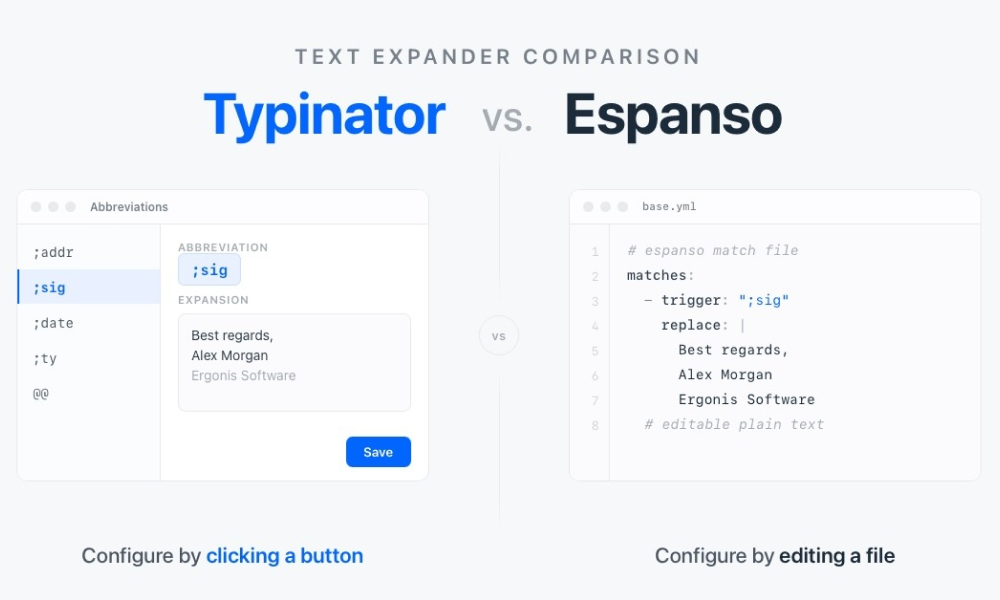
Comparing Typinator and Espanso comes down to one question before any feature list: do you want to configure a text expander, or do you want to use one? Both tools expand text system-wide on macOS. The gap is everything that happens before and after a snippet fires.
| Feature | Typinator | Espanso |
| License | Subscription | GPL v3 Open Source |
| Vendor | ergonis Software GmbH, Austria, founded 2002 | Open-source project, no legal entity |
| Setup | Native GUI, no coding required | YAML config file, coding knowledge required |
| Platforms | macOS, iOS companion app | macOS, Windows, Linux |
| Security | ISO 27001 certified company, GDPR, EU-based | Source-auditable, written in Rust |
| Team sharing | NAS, local network, Dropbox, iCloud | Git repository |
| Support | Email support | Community: GitHub Issues, forum |
| Migration | Import from any text expander using .plist or .csv export | Manual rebuild in YAML |
| AI features | Apple Intelligence as authoring assistant | None |
| Scripting | AppleScript, shell, macros via GUI | Shell and any language via YAML |
| Best fit | Sales, support, marketing, HR, legal, power users, devs | Developers and DevOps teams with YAML fluency |
What actually happens when you add your first snippet?
This is the fastest way to understand which tool you are looking for.
With Espanso, adding a snippet means opening a YAML config file in a text editor, writing the trigger and replacement in the correct syntax, saving the file, and restarting the Espanso daemon. If the syntax is right, the snippet works. If not, you debug.
With Typinator, you click the plus button, type the abbreviation, type the expansion, and press Return. Done. Get started with Typinator.
That gap is not a flaw in Espanso. It is a deliberate design choice that reflects who Espanso is built for. The problem shows up when you put that workflow in front of someone who does not live in config files. Most people try it once, hit a YAML error, and stop using it within a week. That is not a failure of motivation. It is a mismatch between tool design and user profile.
Typinator holds a 4.9/5 on both G2 and Capterra, rated across individual users, editorial professionals, and customer support teams. The recurring theme in reviews: setup takes minutes, and expansion works across every app without adjustment.
Is Espanso a solid choice for developers and YAML-fluent users?
For the right user, yes. Espanso is open-source under GPL v3, written in Rust, and fully auditable. A security team can inspect the code directly. There is no vendor, no contract, and no lock-in. It runs on macOS, Windows, and Linux from a single codebase, which makes it attractive in engineering environments where the team spans operating systems.
For developers already working in YAML and Git, the config-file approach extends existing habits rather than adding a new tool layer. Espanso Hub provides ready-made snippet collections for common use cases. For pure scripting range, Espanso accepts any language your system runs, which is a wider surface than Typinator's AppleScript and shell scope.
If that describes your situation, Espanso is a capable tool at no cost. The limits show up the moment the team includes someone who is not comfortable maintaining a YAML file, or the moment procurement asks for a vendor to sign a DPA with.
Where does Espanso stop working for business teams?
The YAML-or-nothing architecture creates specific failures at the team level that are worth naming clearly.
Onboarding outside engineering is not realistic. A sales representative who needs to add a new snippet must locate the YAML file, understand the syntax, edit it correctly, save it, and restart the daemon. In every business function outside software development, this is not a workflow people maintain. It falls to one person who becomes a bottleneck, or it stops being maintained.
Team sharing requires Git. Espanso has no built-in mechanism for distributing snippet libraries across a team without a version control system. For engineering teams, that is normal. For sales, support, HR, or legal teams, it is an unreasonable operational requirement.
There is no legal entity to contract with. Espanso is an open-source project. No company stands behind it. This creates a hard stop in any regulated or enterprise procurement context: no DPA, no SLA, no support contract, no liability. Many compliance teams require a DPA with a named vendor even when the software itself runs entirely locally. That vendor does not exist here.
Support is community-only. Help is available through GitHub Issues, Espanso Hub, and community forums. Response time depends on who has time. There is no paid support tier.
Typinator addresses all four directly. Snippet libraries are shared over NAS, local network drives, Dropbox, or iCloud without a Git repository. Any team member can edit a snippet from the GUI without touching a config file. ergonis Software GmbH is an EU-based legal entity, ISO 27001 certified at the company level, and able to provide a data processing agreement for regulated industries. Email support is included.
How far does the automation go?
Typinator supports AppleScript, shell scripts, and macro execution through its visual interface. Dynamic forms with fill-in fields and dropdown menus are built in, useful for templates where values change each time. A non-technical user can run a form that a power user built without understanding how it was configured.
Espanso supports scripting in any language your system runs: shell, Python, and beyond, all configured via YAML. Forms are possible but require setup in config files and are harder to distribute to non-technical teammates.
For pure scripting surface area, Espanso has the wider range. For practical daily use across mixed teams, Typinator makes the same functionality accessible without requiring everyone on the team to understand the underlying configuration. Explore Typinator's automation features.
Does it work on iPhone and iPad?
Espanso is desktop only. There is no iOS app, no Android app, and no confirmed timeline for either. If your snippets need to follow you to your phone, Espanso is not the answer.
Typinator 10 includes a native iOS companion app with a custom keyboard for iPhone and iPad. Your snippet library syncs across Mac and iOS via iCloud. The same abbreviations work at your desk and on your phone.
Two things to state clearly: the iOS app requires an active Typinator Mac license. It is not a standalone product. Sync between Mac and iOS runs via iCloud only.
Jean-Francois B., an editor and copyeditor who uses Typinator across personal and professional work, described the cross-device experience in his G2 review: "I love the clean look, speed, and the very responsive iOS/iPadOS keyboard. The iCloud syncing mechanism works very well, and it's nice having everything the same on all my devices."
Free vs. paid: what does the subscription actually include?
Espanso is completely free. No subscription, no paid tier, no locked features. If YAML config files are part of your normal workflow and you do not need mobile support or a graphical interface, the cost argument is direct.
Typinator's subscription starts at $29.99 per year and includes the full Mac application, the iOS companion app with custom keyboard, all features including dynamic forms, AppleScript and shell scripting, and Apple Intelligence as an authoring tool for building and refining abbreviations, plus email support and all updates. There are no locked tiers or separate pricing for specific features. See full pricing.
The right framing is not "free vs. paid." It is "which tool actually fits how my work is structured, and what breaks if it does not?" Typinator earned Capterra Best Value 2026 and Software Advice Most Recommended 2026. Read why Typinator is rated 4.9 on Capterra.
Try Typinator with the "try before you buy" trial. Download it for free.
Quick decision guide
| Choose Typinator if | Choose Espanso if |
| You want to add snippets without editing config files | You already work in YAML and Git daily |
| Your team includes non-technical users in sales, support, HR, or legal | You need cross-platform support for Linux or Windows today |
| You need ISO 27001, GDPR documentation, or a signed DPA | Open-source auditability is a hard requirement |
| Snippets need to follow you to iPhone and iPad | Your work is entirely desktop-based on macOS |
| You want support and a named vendor | Zero cost and no vendor dependency are the primary criteria |
FAQ
What makes Typinator different from Espanso?
Typinator is a native macOS application with a graphical interface built by ergonis Software GmbH, an Austrian company founded in 2002. Espanso is an open-source daemon configured through YAML files with no company behind it. Both expand text system-wide on macOS. The difference is setup and maintenance: adding a snippet in Typinator takes three clicks; in Espanso it means editing a config file and restarting the daemon. For individual technical users, Espanso works well at no cost. For teams with non-technical members, or for anyone who does not want to manage config files, Typinator removes that layer entirely.
Does Typinator work on iPhone and iPad?
Yes. Typinator 10 includes a native iOS companion app with a custom keyboard. The snippet library syncs across Mac and iOS via iCloud. Note that the iOS app requires an active Typinator Mac license. It is not a standalone product.
Can Espanso be used in regulated industries under GDPR?
Espanso runs entirely locally, so no data leaves your machine. However, most regulated procurement processes require a signed data processing agreement with a named vendor. Espanso has no legal entity behind it, so there is no DPA to sign. ergonis Software GmbH provides a DPA, is ISO 27001 certified at the company level, and is subject to EU data protection law.
Does Typinator store data in the cloud?
No. All snippets are stored locally on your device by default. You choose the sync method: iCloud, Dropbox, NAS, a custom network folder, or no sync at all. ergonis does not run a central data store. No snippet data is processed by ergonis infrastructure.
Is Typinator usable for non-technical teams like sales or support?
Yes. Adding, editing, and organizing snippets requires no knowledge of configuration files or scripting. Team members can use forms and templates built by power users without understanding how they were set up. Shared snippet libraries can be distributed over a local network or NAS without a Git repository.
What does Typinator's subscription include?
The annual plan starts at $29.99 and includes the full Mac application, the iOS companion app with custom keyboard, all features including dynamic forms, AppleScript and shell scripting, and Apple Intelligence as an authoring tool for building abbreviations, plus email support and all updates. There are no locked tiers or separate pricing for specific features.
Related to